Manage your Fieldwell subscription
Upgrade or downgrade your plan, change monthly or annual billing, cancel renewal, download invoices or update your payment method.
One subscription covers the household and its invited members. Only the current household owner can manage billing; members should ask their owner.
Upgrade your subscription
- Sign in as the household owner, open Billing and check the household name.
- Under Manage your subscription, use Choose a different plan or billing frequency to select Planning instead of Plus.
- Select Review plan change. Check the amount due now, recurring price and effective date.
- Tick I agree to the change and any charge described above, then select Confirm change only if you want to proceed.
- Complete any payment authentication with Stripe. Return to Billing and choose Check subscription status, then Refresh billing.
A Plus-to-Planning upgrade with the same billing frequency shows the net charge after unused service is credited. Access upgrades only after payment is confirmed; a verified zero amount requires no new payment. Changing both plan and frequency starts at renewal instead.
The confirmation expires after five minutes. If it expires, refresh and review again. If a payment outcome is uncertain, contact support instead of repeating it.
Start a subscription after your trial
- Open Billing as the owner after the full no-card 30-day trial.
- Choose Monthly or Annual, then Choose Plus or Choose Planning.
- Review the price, recurring terms and linked Terms/Privacy. Tick the agreement and select Agree & continue to enter Stripe checkout.
- Complete payment and return to Billing to check the confirmed status.
Choosing a card alone does not charge you. Purchase is unavailable during the trial; an expired trial does not automatically start a paid subscription.
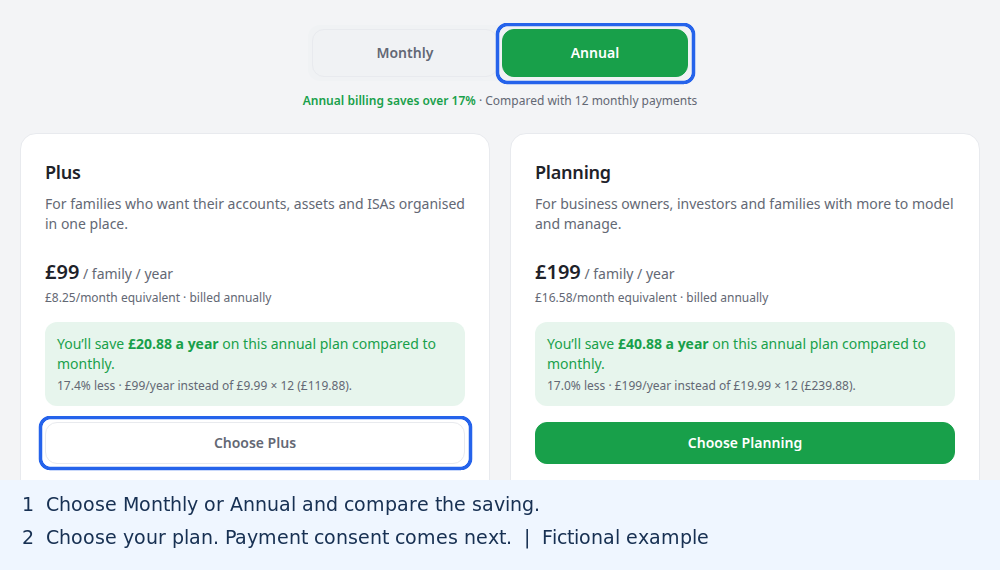
Downgrade or change billing frequency
As owner, choose the new plan or monthly/annual frequency in Manage your subscription, then Review plan change. Check the renewal date and price, tick the agreement and Confirm change. These changes start at renewal, not immediately.
Existing records remain viewable/exportable; a lower plan can restrict new work. Remove excess bank connections before adding more on a lower allowance.
Cancel renewal or keep your plan
- As owner, open Billing and select Cancel renewal.
- Review the paid-through date, tick the agreement and select Confirm change.
- Check the updated subscription status.
Cancellation preserves access through the paid period. It does not immediately delete household data or automatically refund payment. Before renewal, Keep my current plan and renewal lets you review and confirm removal of a scheduled downgrade or cancellation.
Download invoices or change your card
If Billing shows Complimentary Planning · no expiry, that household needs no paid upgrade or renewal. Any existing Stripe subscription remains separate. Cancelling its renewal does not remove complimentary access. New purchase and plan-change controls are unavailable while the grant is active.
- As owner, open Billing → Manage billing.
- In Stripe's secure portal, download invoice copies or update your payment method.
- Return to Fieldwell. Review plan changes and cancellation in Fieldwell's Billing page.
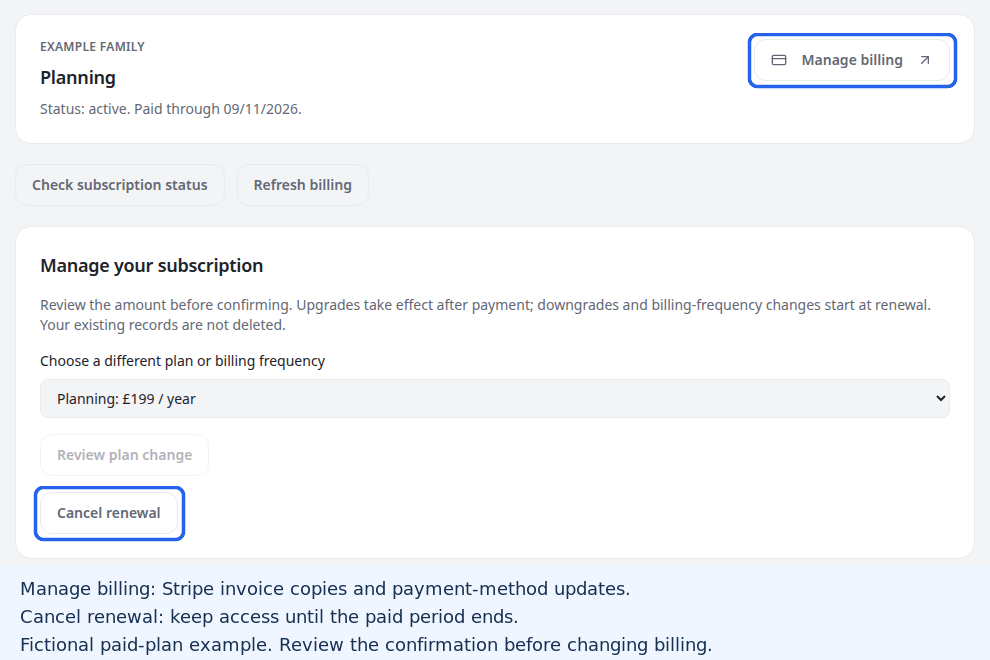
Failed payments, refunds and access ending
For a failed renewal, the owner can update the payment method through Manage billing, complete any requested Stripe authentication and check subscription status. The seven-day access grace starts from the end of the paid period; retries do not restart it. Stripe collection can continue after access ends.
For refunds or a message requiring support, contact the Fieldwell team. Refunds are handled through support, subject to applicable consumer rights.
Billing shows whether automatic expiry deletion applies. See Export and delete a household before closing a household; cancelling renewal and deleting it are different actions.